HR features

Everything HR needs, in one place.

IslandsHR follows each person from the first application to the last day: who they are, where they work, when they are away and what is about to expire. Payroll is an optional module at the end of this page. HR is a complete product on its own.

HR Modules

The HR side, module by module.

Plans decide which modules are switched on. The tag on each module shows the plan it starts with. Compare plans.

01Starter

Who is away, and what needs you

The Today screen is the first thing you see. Leave waiting for your decision, who is away and when they are back, upcoming birthdays and work anniversaries, and work permits and documents that are about to expire, all on one page.

  • Approve or reject leave without leaving the page
  • Who is away today, and the day they return
  • Birthdays and work anniversaries coming up
  • Work permits and documents expiring soon
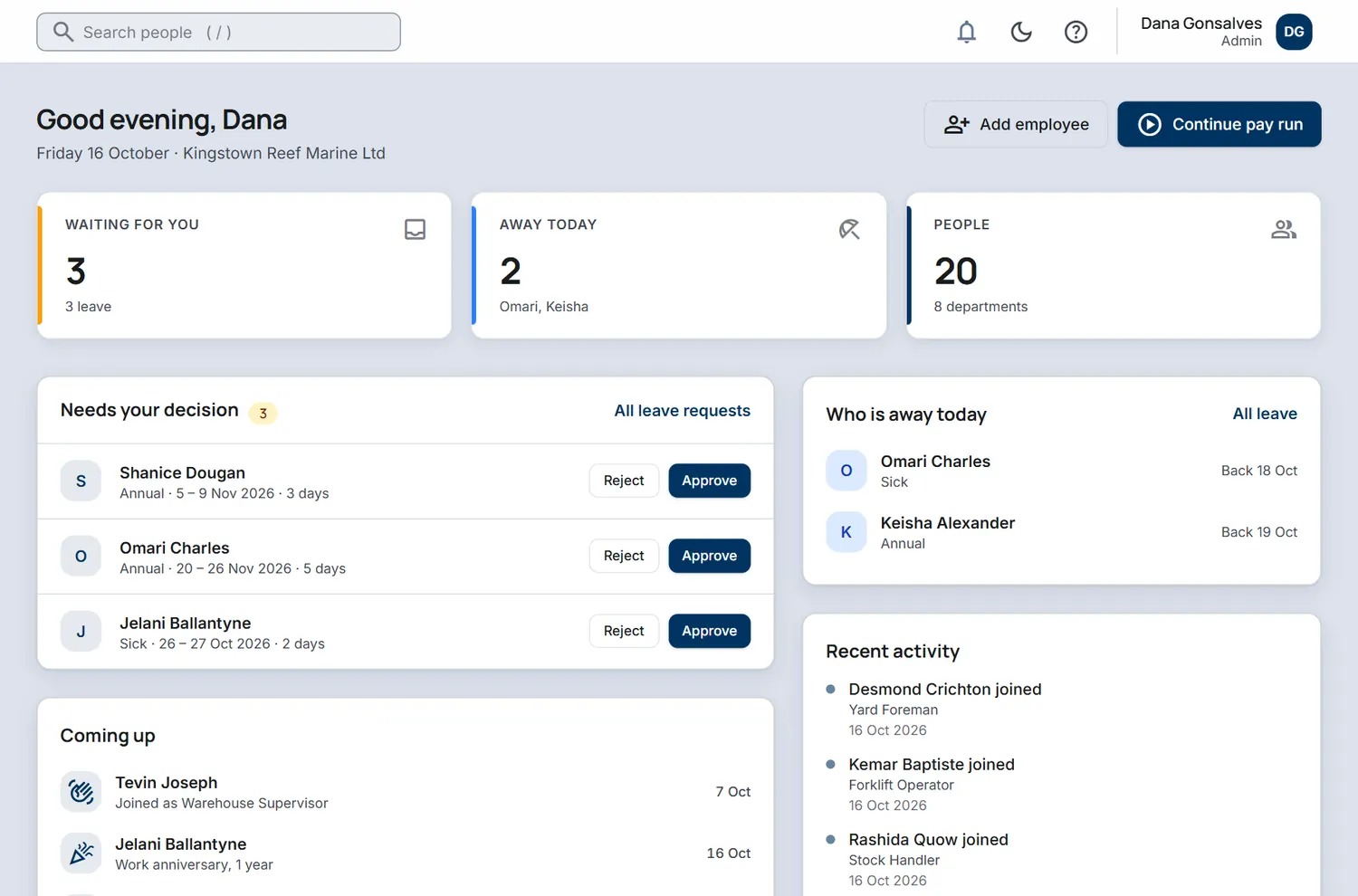
The Today screen for a sample company with leave waiting for approval, who is away, recent activity and what is coming up.
The Today screen, sample company.
02Starter

People and org chart

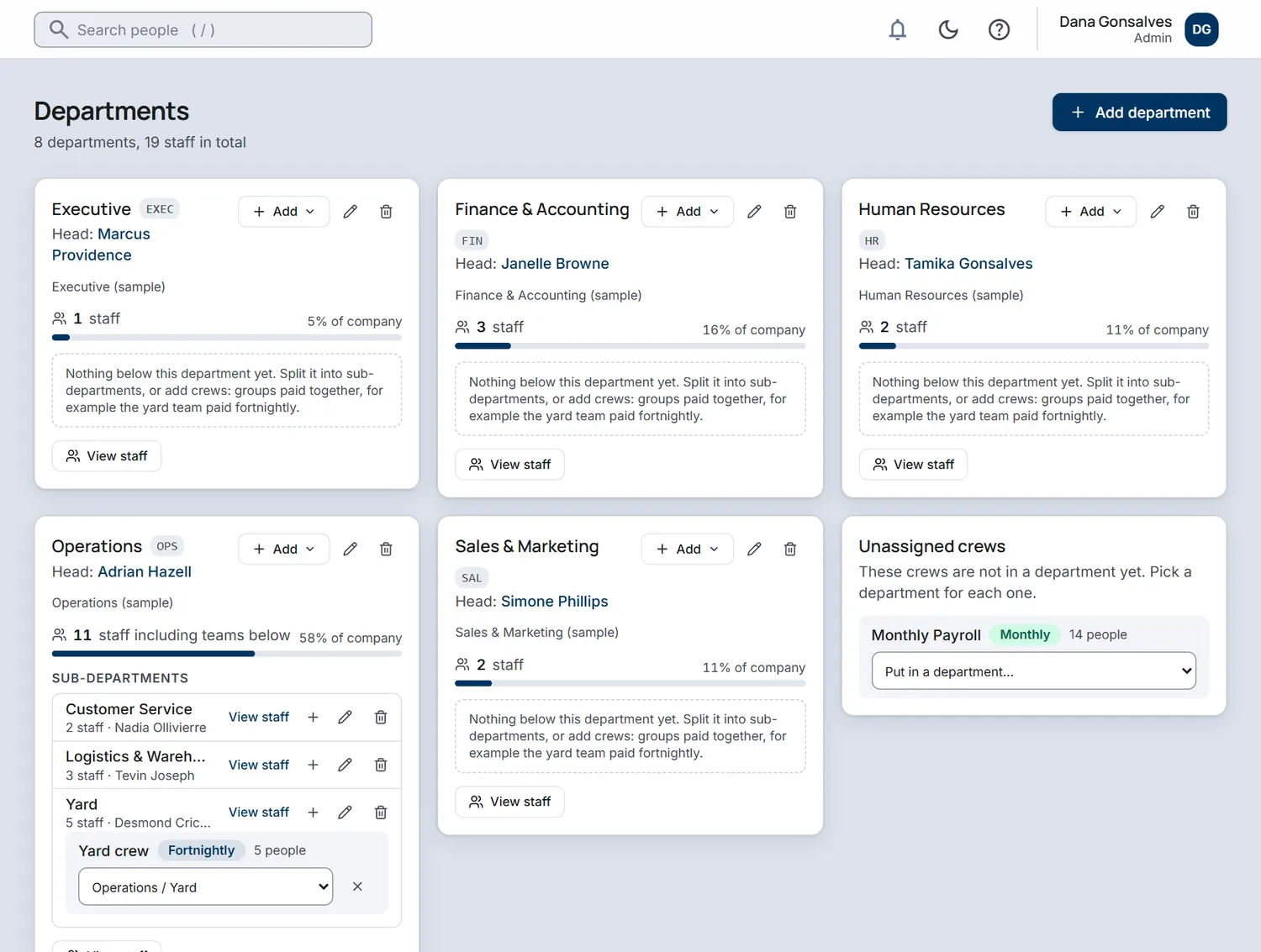
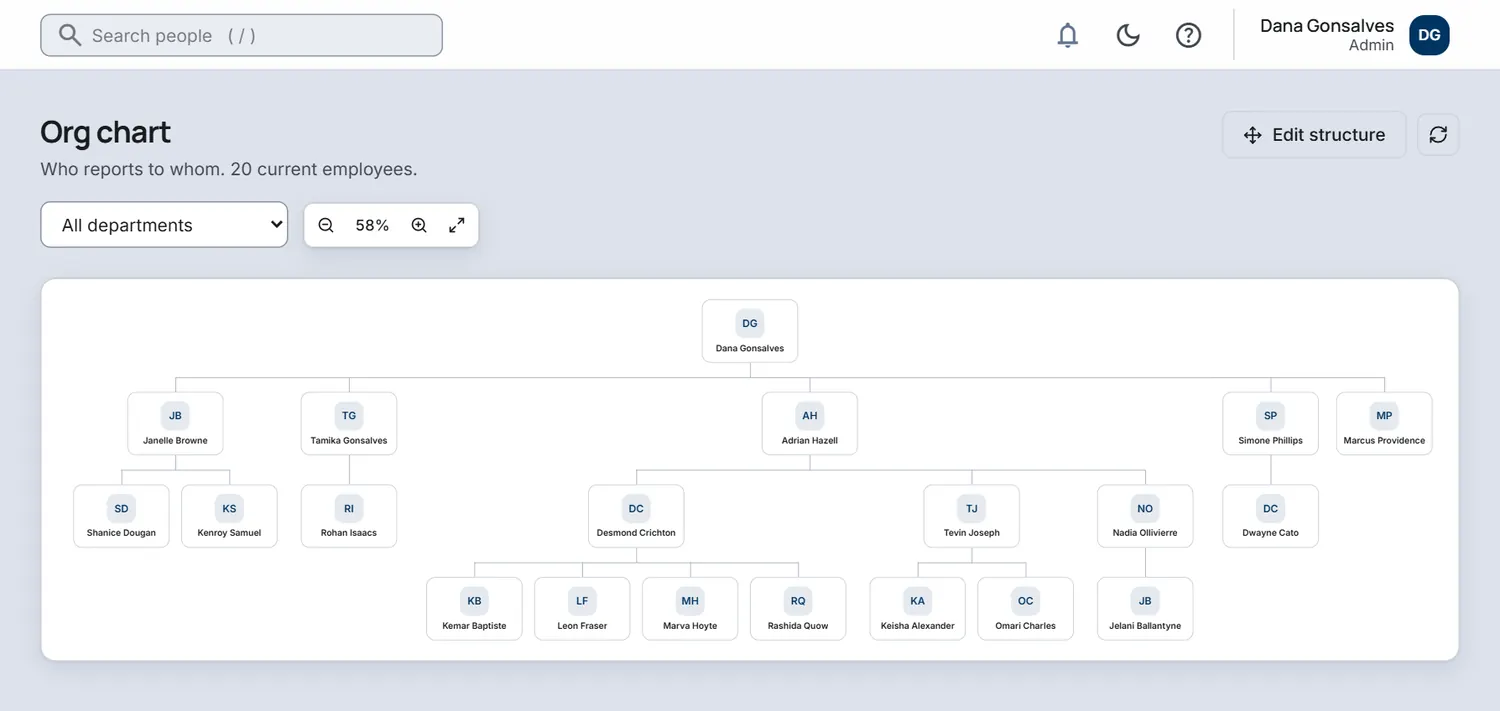
Every employee has one record that holds the lot: job and department, contact details, documents, leave and history. Sensitive fields such as NIS numbers and bank accounts are stored encrypted. Departments can have sub-departments, and the org chart draws itself from who reports to whom.

  • Add people one at a time or import them from a spreadsheet
  • Departments with heads, sub-departments and crews
  • A live org chart you can filter by department
  • Disciplinary and benefits records on the same file
The Departments screen showing eight departments with heads and staff counts, and sub-departments inside Operations.
Departments with sub-departments, sample company.
The org chart screen showing who reports to whom in a company of 20 employees.
The org chart, sample company.
03Starter

Leave and time off

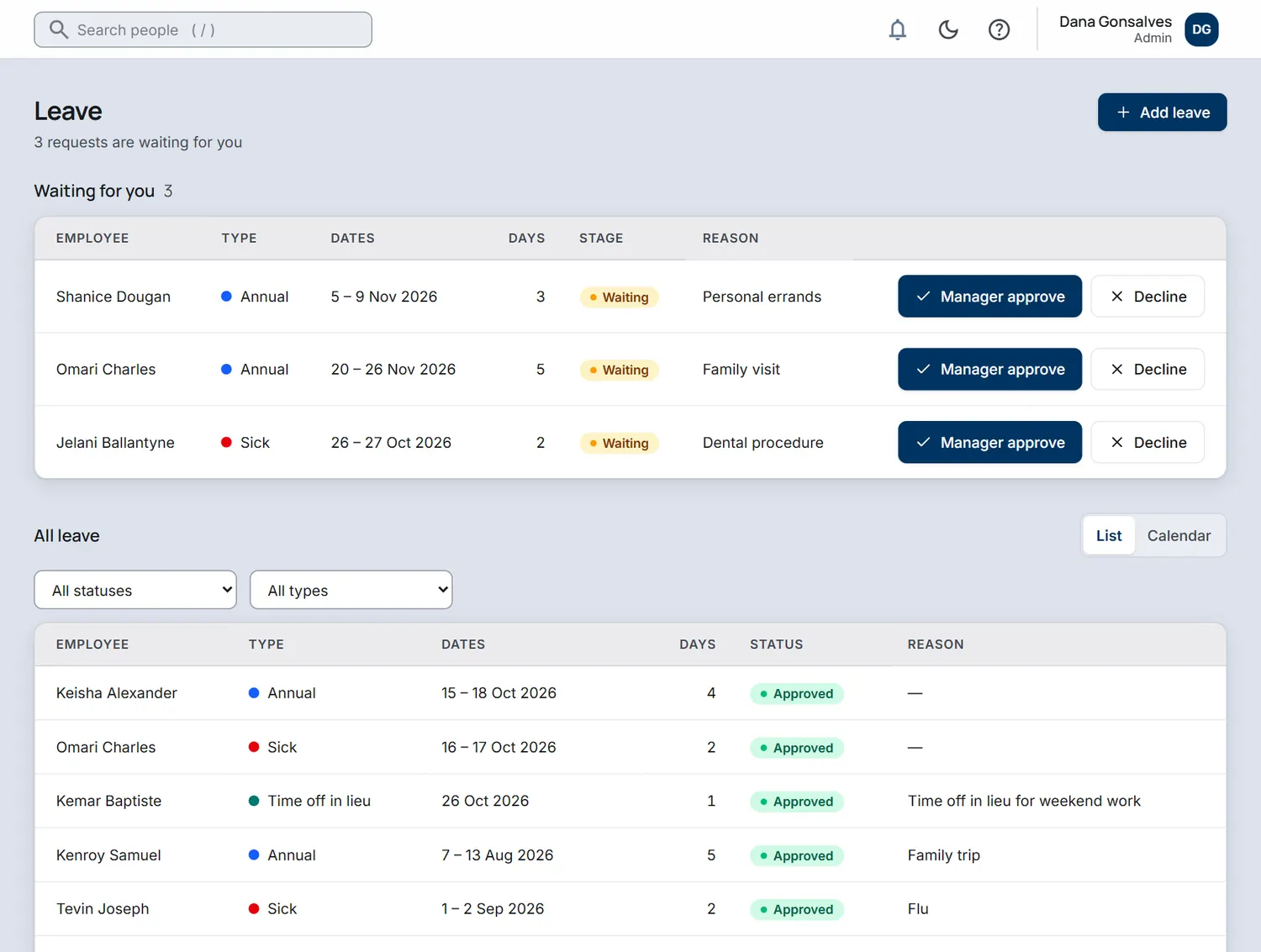
Staff ask for leave from their phone. Managers approve or decline with one tap, and balances update by themselves. A shared calendar shows who is away and when, so Monday morning holds no surprises.

  • Leave types and yearly allowances you define
  • Manager approval, with the stage shown on every request
  • List and calendar views of every request
  • Sick leave, annual leave and time off in lieu in one place
The Leave screen with three requests waiting for approval and a list of recent leave.
Leave requests and approvals, sample company.
04Starter

Time and attendance

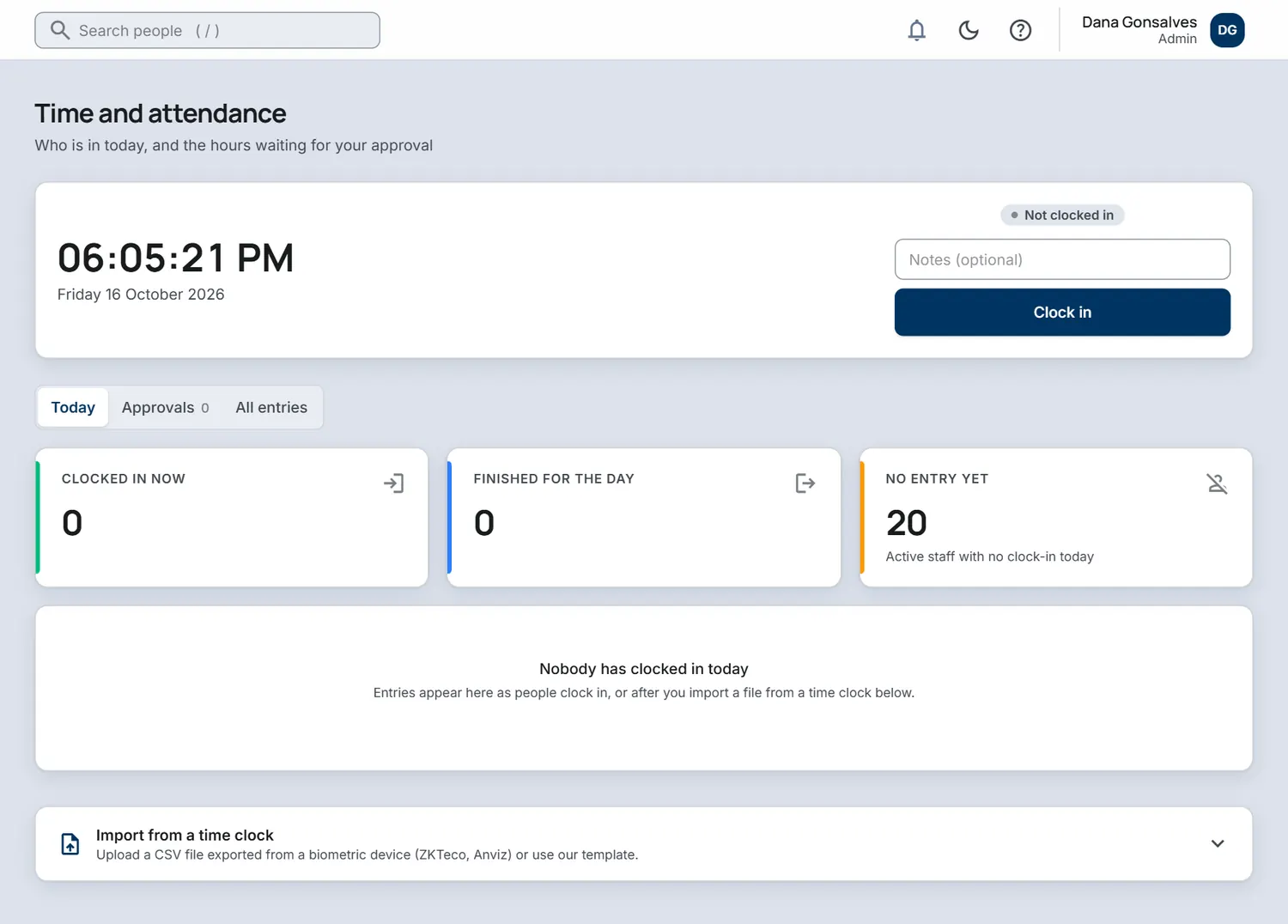
Staff clock in and out, managers review and approve the hours, and you can see who is in today without chasing paper timesheets at the end of the week.

  • A time clock, or hours entered by hand
  • Manager approval of the timesheet
  • Who has clocked in, who has finished and who has not arrived
  • Import from a biometric time clock export
The Time and attendance screen with a clock in button and counts for who has clocked in today.
Time and attendance, sample company.
05Starter

Documents and expiries

Contracts, IDs, certificates and work permits are stored against the person, with company-wide documents everyone can read from the portal. Expiry dates feed the Today screen so nothing lapses by surprise.

  • Files stored per employee
  • Company documents shared with all staff
  • Expiry dates for work permits and documents
  • Access controlled by role
06Starter

The employee portal

Every member of staff gets their own sign-in. They request leave, clock in, see their schedule, read announcements and company documents, and keep their own details up to date, so HR stops being the answer desk.

  • Leave balances and requests
  • Schedule and time clock
  • Announcements and a knowledge base
  • Managers see their own team's leave and time to approve
07Starter

Onboarding plans

Build task templates once, with due dates set from the start date, including tasks that fall before day one. Use a different plan for each department, crew or employment type. New hires get a Welcome checklist in the employee portal, and HR approves the details they send before anything is saved.

  • Task templates with due dates relative to the start date, including before day one
  • A plan for each department, crew or employment type
  • New hires upload their documents and submit NIS, TIN, bank and emergency contact details. HR approves them before anything is saved
  • Probation reminders at 30 and 7 days, with confirm, extend or end
08Starter

Insights for managers

One page that shows how your workforce is changing, without a spreadsheet. See headcount over time by department, who joined and who left, and how absence and turnover are moving, with a red, amber and green scorecard for what needs attention.

  • Headcount over time by department, joiners and leavers, and 12-month turnover
  • Absence rate and Bradford scores, which flag repeated short absences
  • Tenure, age and gender mix, leaving reasons and expense spend
  • Compliance scorecard: work permits, contracts, probation, mandatory training, documents and reviews
  • With the payroll module added: labour cost by month and department, overtime cost and leave liability in money. Admins can hide pay figures from HR users
09Professional

Hiring

Publish a careers page for your company and follow every candidate from application to first day in one place. Candidates apply in one click, you run interviews and send offers from templates, and a hired candidate becomes an employee in one click.

  • A public careers page for your company with one-click apply: CV upload, phone and WhatsApp number
  • Hiring stages you can edit, with the full history for every candidate
  • Interviews with scorecards and calendar invites
  • Offer letters from templates with merge fields. Candidates accept online by typing their name
  • One-click conversion of a hired candidate into an employee. The portal invite and onboarding plan follow, and with the payroll add-on the pay record and pay batch do too
  • Source and rejection tracking, a talent pool for seasonal and day-crew hiring, and a hiring funnel with time to hire
10Professional

Performance and training

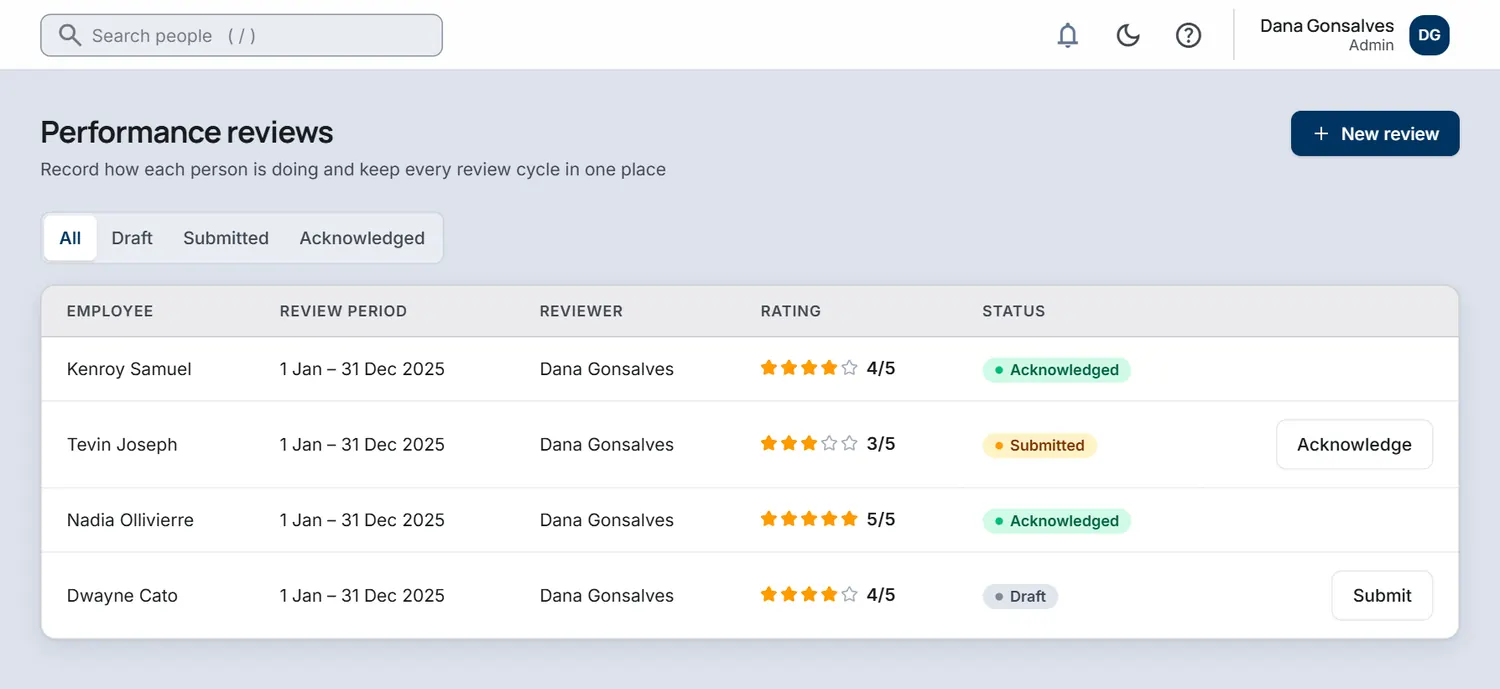
Run reviews with a rating and written notes, let the employee acknowledge them, and keep a record of who has been trained on what, so safety and skills are never a guess.

  • A review for each person with a rating out of five and notes
  • Draft, submitted and acknowledged stages
  • Training records per employee
The Performance reviews screen listing reviews with star ratings and draft, submitted and acknowledged statuses.
Performance reviews, sample company.
11Professional

Surveys and recognition

Ask the team how things are with short pulse surveys, and let colleagues recognise each other against your own company values. Surveys are anonymous by design: answers are not linked to a person, and results for groups under 5 are hidden.

  • Pulse survey templates with eNPS, response rates and a trend over time
  • Answers are not linked to a person, and results for groups under 5 are hidden
  • A company feed of peer recognition against your own company values
  • Reactions on every post, with bell and email notifications
12Professional

Expenses and assets

Staff submit claims with a photo of the receipt. Managers approve them. You also keep track of the laptops, phones and tools you have issued and who holds them.

  • Expense claims with receipts and manager approval
  • Asset register with who holds what
  • Issued items checked off when someone leaves
13Professional

Offboarding and former employees

A leaving checklist takes HR through each departure. The final pay summary is for HR to review and is never paid automatically. On the last day the portal login is switched off, and when the checklist is complete the person is removed from pay batches.

  • Leaving checklist, exit interview and asset returns
  • Final pay summary for HR to review: leave payout, open loans and time off in lieu. Never paid automatically
  • Portal login switched off on the last day. Open shifts and leave are cancelled
  • Removal from pay batches when the checklist is completed
  • A Former employees archive and a downloadable leaver file (ZIP)
  • A retention setting, with old records anonymised only after an admin confirms
14Professional

Reports and report builder

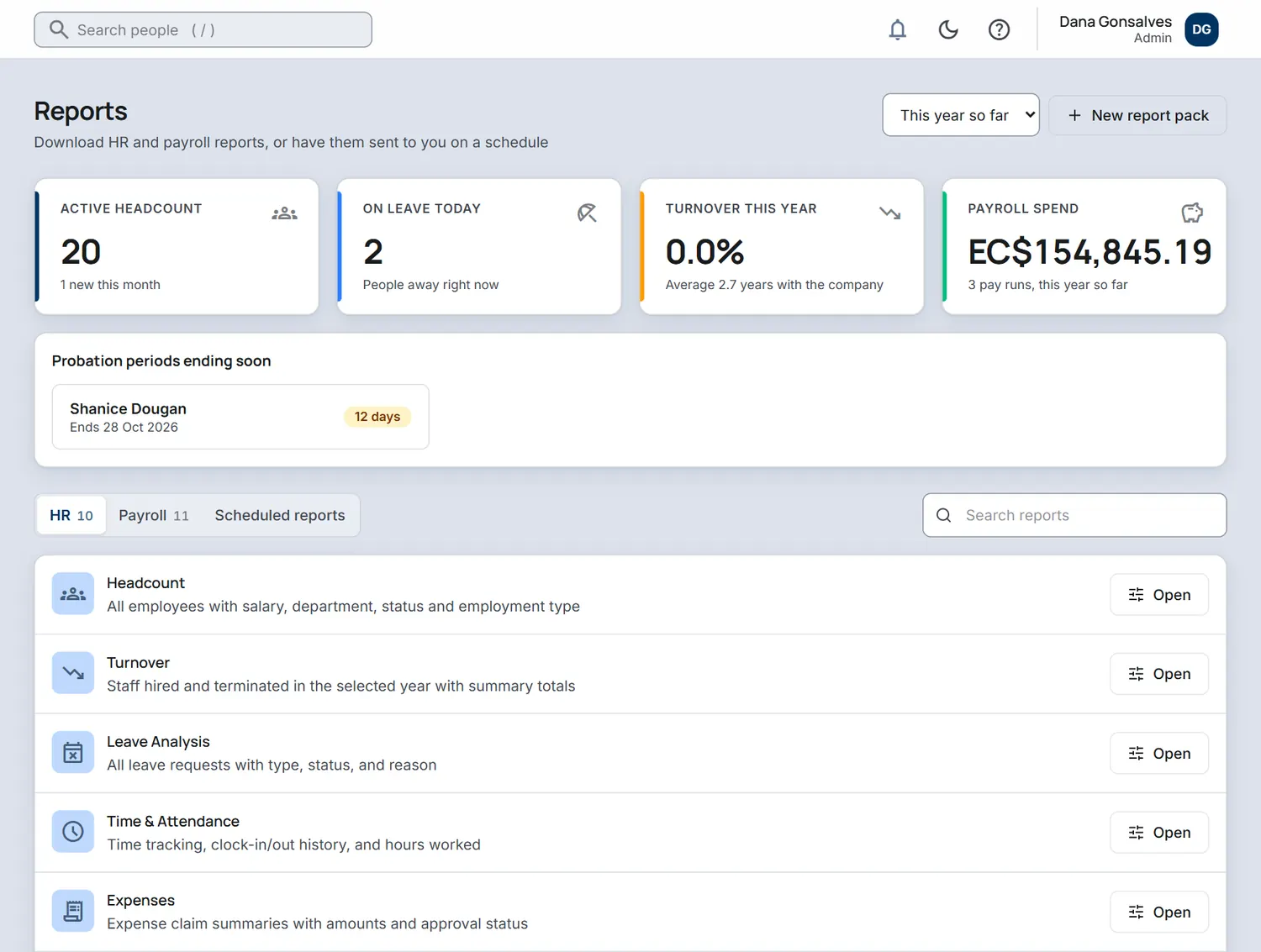
Standard headcount, turnover, leave and time reports you can read on screen or take away, plus a report builder for everything else. Pick a dataset, columns, filters and grouping, save the view and export it. Schedule a saved view or a standard report to arrive on its own.

  • Headcount, turnover, leave, time and attendance and expense reports
  • Report builder: choose a dataset, columns, filters and grouping, and save views
  • Export to CSV or Excel
  • Scheduled delivery as a notification or an emailed login link. The email never contains the figures
The Reports screen with headcount, people on leave and turnover figures and a list of HR reports.
Reports, sample company.
15Enterprise

Shift scheduling

Build the week by area, keep drafts to yourself and publish when you are ready. Staff only ever see the final roster, so a half-finished plan never causes an argument.

  • Weekly roster by area, such as dock, office or workshop
  • Draft shifts stay hidden until you publish the week
  • Staff see their own schedule in the portal
16Enterprise

Compensation planning

Run a raise cycle with a budget. Managers propose raises for their own people, HR approves, and an admin applies the approved cycle to pay, with a history kept. Raises never change pay until an admin applies the cycle.

  • Raise cycles with a budget
  • Manager proposals and HR approval
  • Applied to pay by an admin, with a history of every change
  • No change to anyone's pay before the cycle is applied
17Enterprise

Workflow automation

Set rules that run on dates: a probation ending, a work permit or document expiring, a work anniversary, a birthday or a follow-up after a new hire starts. A rule can notify someone, send an email or create a task.

  • Date-based rules for probation, work permit and document expiry, anniversaries, birthdays and new-hire follow-ups
  • Notify, email or create a task
  • One-click starter recipes to begin with
  • A test run before you turn a rule on

Support is built in. On every plan you can message the IslandsHR team from inside the app. The contact form on this website also sends your message straight to us. Contact us.

PAY Payroll module, an add-on

Add payroll when you are ready.

HR is complete without it. When you want to pay people from the same records, switch the payroll module on from Settings. It is free during your trial. St Vincent and the Grenadines is live today; other islands open one at a time, after an accountant has checked the rules.

Ask about payroll for your island

P1Payroll add-on

Pay runs you can follow

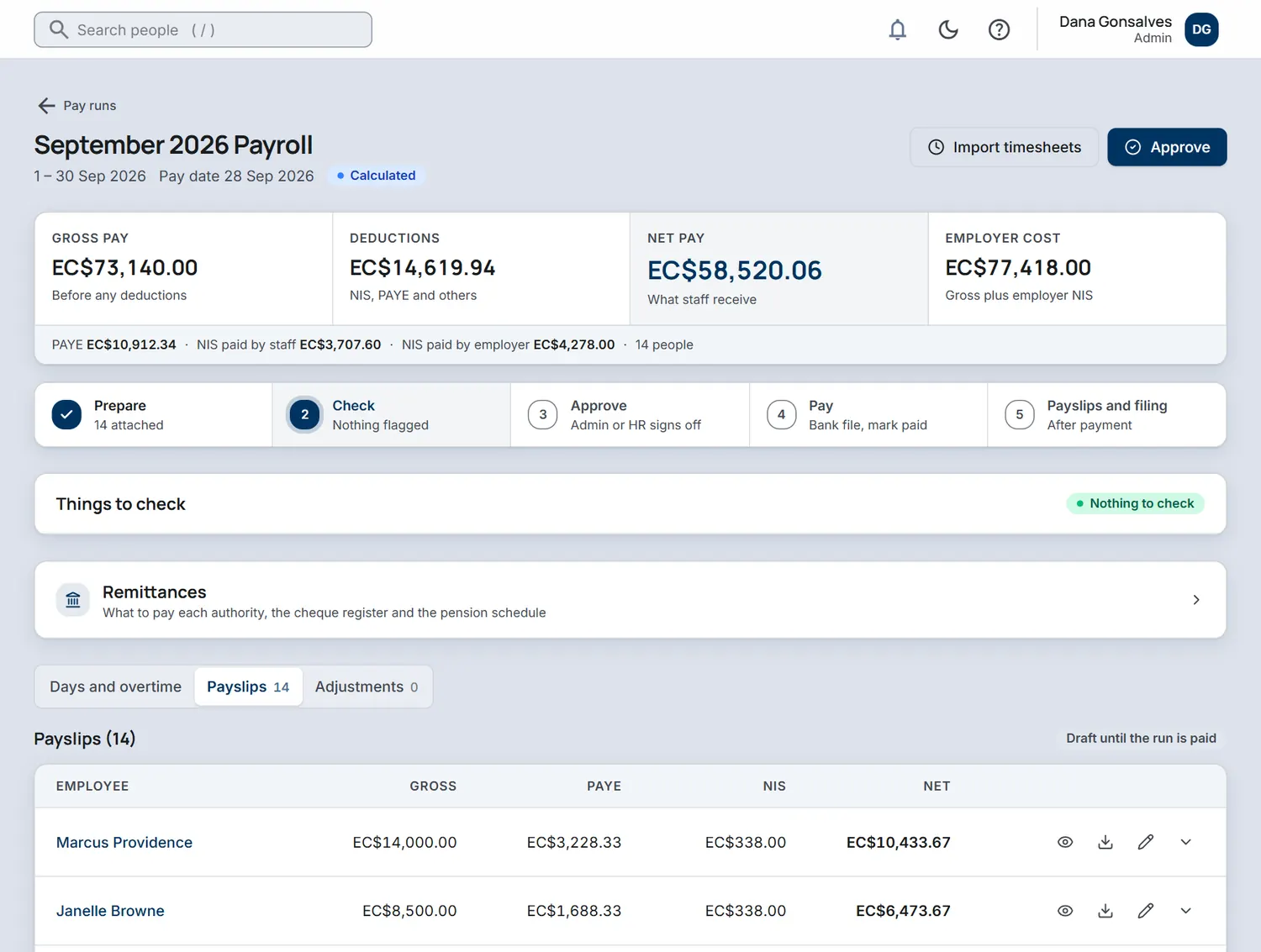
Start a pay run, choose who is in it, enter days and overtime in one grid, check the figures and approve. Approval locks every payslip so the numbers cannot change quietly afterwards.

  • Fortnightly crews: day rate times the days entered
  • Monthly staff: salary, with a day rate worked out for part months
  • Gross, deductions, net pay and employer cost at a glance
  • Approve, pay and file in clear steps
A September 2026 pay run showing gross pay, deductions, net pay, employer cost and the payslips in the run.
A pay run, sample company.
P2Payroll add-on

Crews for fortnightly and monthly pay

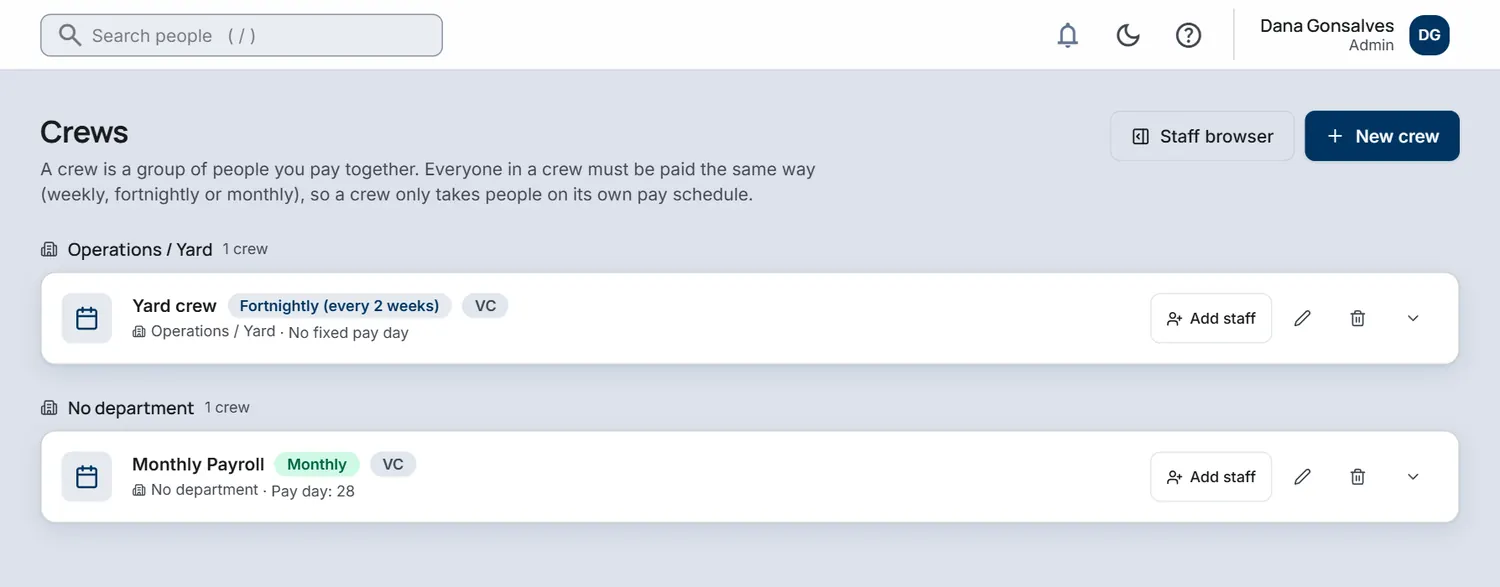
A crew is a group of people you pay together. Everyone in a crew is paid on the same schedule, weekly, fortnightly or monthly, and you choose a person's crew when you onboard them.

  • One crew per person and pay frequency
  • Crews can sit inside a department or site
  • Pay runs only take people from their own crew
The Crews screen with a fortnightly Yard crew and a Monthly Payroll crew.
Crews, sample company.
P3Payroll add-on

Payslips your team can read

Every payslip shows how it adds up: gross pay, NIS, PAYE and net. Staff cannot see a payslip while a run is in draft. Once you mark the run as paid, they open it in the portal.

  • Clear line-by-line payslips
  • Released to staff only after the run is paid
  • Employer-side NIS shown separately, never deducted from the employee
Example
Payslip, monthly2026 rules
Gross salary
12,000.00
NIS, employee6.5% of insurable pay, up to the EC$5,200 monthly ceiling
−338.00
PAYEAfter the EC$25,000 yearly standard deduction
−2,668.34
Net pay (EC$)
8,993.66

Employer NIS of 390.00 (7.5%) is paid on top and never deducted from the employee.

P4Payroll add-on

Overtime and time off in lieu

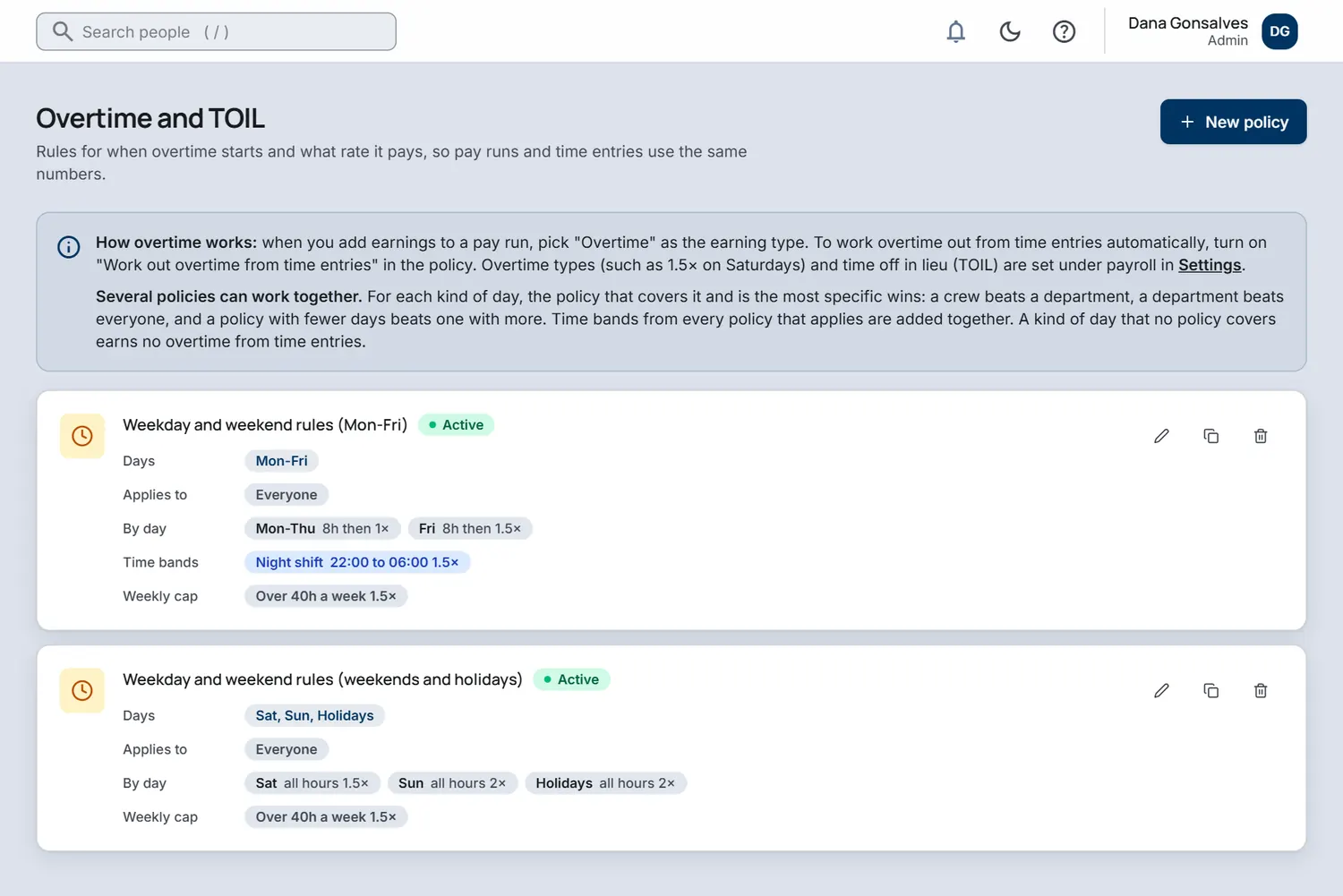
Define the overtime types your company actually uses, with the multiplier for each. Every employee takes overtime either as pay or as banked time off, and the ledger keeps count.

  • Overtime policies and multipliers you define
  • Night shift and weekend rates
  • Pay or time off in lieu, set per person
The Overtime and TOIL screen with policies for weekday and weekend rules and their rates.
Overtime policies, sample company.
P5Payroll add-on

NIS and PAYE, built in

The St Vincent and the Grenadines rules are in the system: NIS rates and ceiling, the minimum contribution, the pensionable age rules and the PAYE standard deduction and bands. They are built from published sources and each rule has an effective date.

  • NIS for employee and employer, with the monthly ceiling
  • PAYE after the standard deduction, in three rate steps
  • Other islands are coming, each one checked by an accountant before it opens
P6Payroll add-on

Bank files

Download a bank file in the format your bank expects, and see the checks before anything leaves your hands: how many payments, the total, whether it matches approved net pay and who was left out.

  • Bank of St Vincent and the Grenadines format today
  • Totals checked against approved net pay
  • Every download recorded in the audit trail
P7Payroll add-on

Statutory returns and filings

The Filings page collects what is owed to NIS and the revenue office for each period, so your accountant is not rebuilding it from payslips on the last day of the month.

  • Per-period NIS and PAYE figures
  • Employee schedule with the working shown
  • You or your accountant review and submit

And the details. Loan repayments, pension policies, allowances and deductions, tax reliefs, pay years and exchange rates for pay in more than one currency are all part of the payroll module.

Try IslandsHR with your own people.

Create a company account, add a few employees and see how the day-to-day feels. Prefer to talk first? Write to us and a real person will reply.