HR software for Caribbean employers

HR for Caribbean employers, with payroll when you need it.

IslandsHR keeps your people records, leave, time and documents in one place, and follows each person from hiring and onboarding to the day they leave. Managers approve in a tap, staff see their own information, and you always know who is away and what is coming up. Need to pay people too? Add the payroll module whenever you are ready.

Free trial HR on its own is a complete product Works in a phone browser

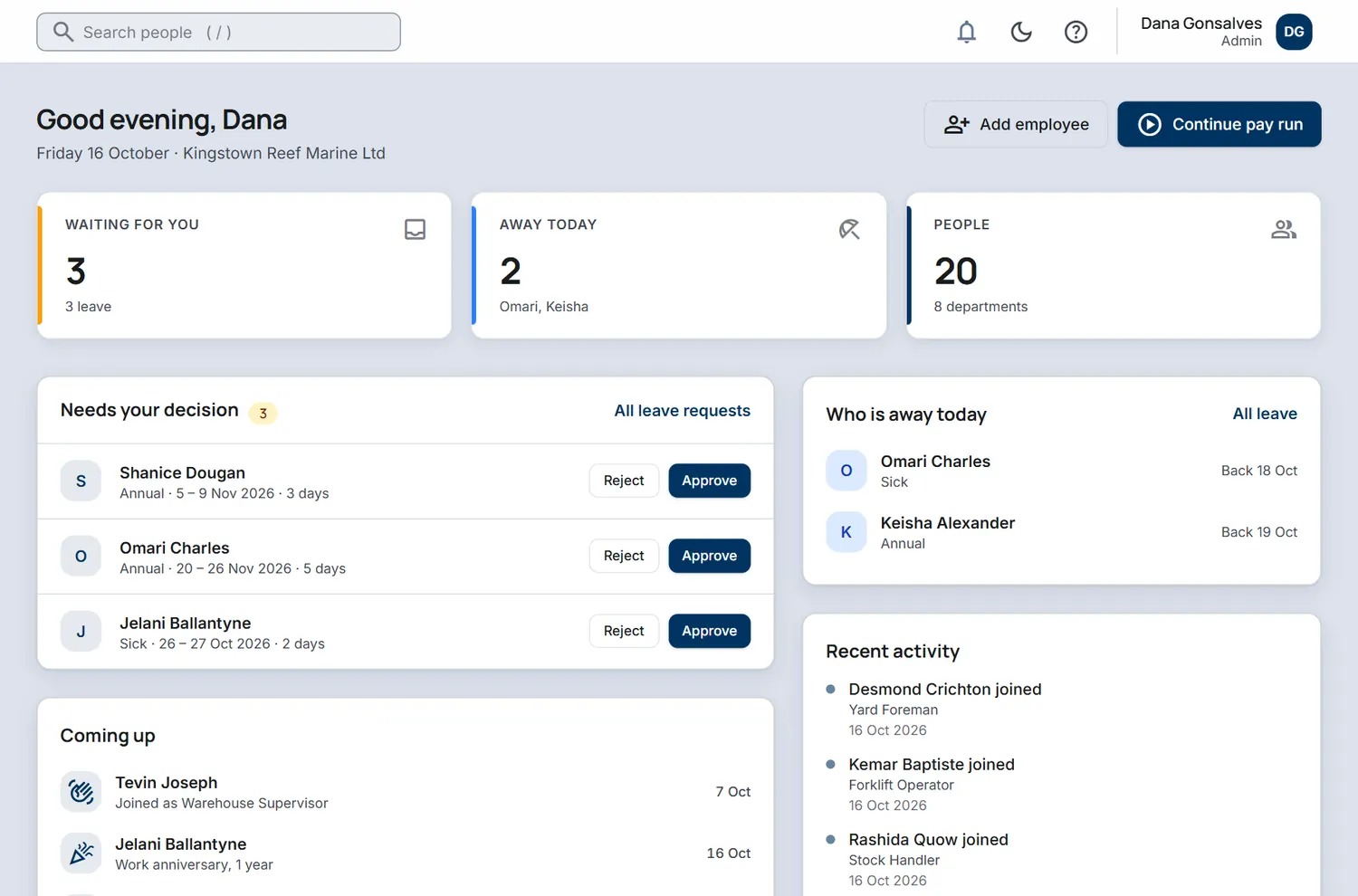
The IslandsHR Today screen for a sample company: three leave requests waiting for approval, two people away today, and upcoming anniversaries and birthdays.
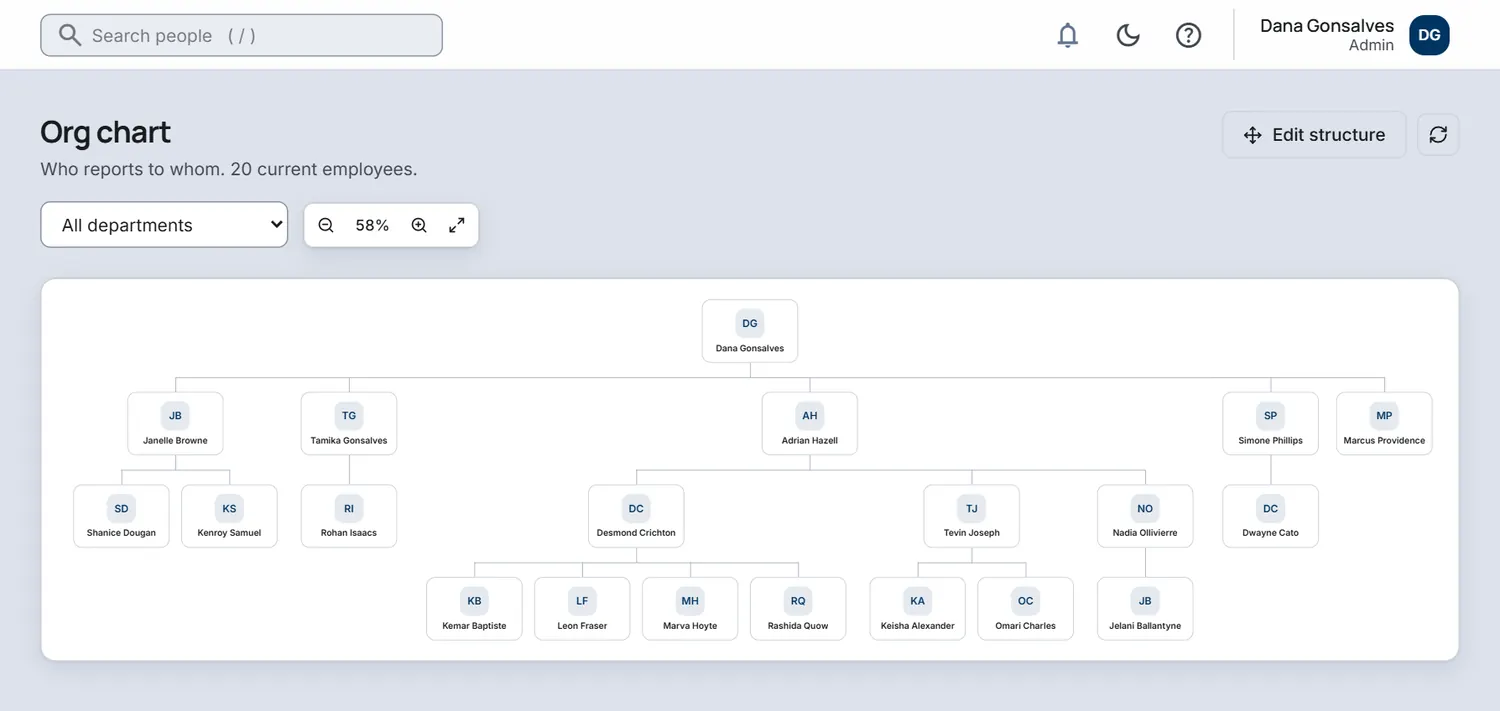
The org chart screen showing who reports to whom across a sample company with 20 employees.
Payroll is optional. Add it when you are ready.

01 What HR gives you

Everything about your people, filed where you can find it.

Start with the basics every employer needs and add the rest as the team grows. One record per person, one place to approve things, and a front page that tells you what needs you today.

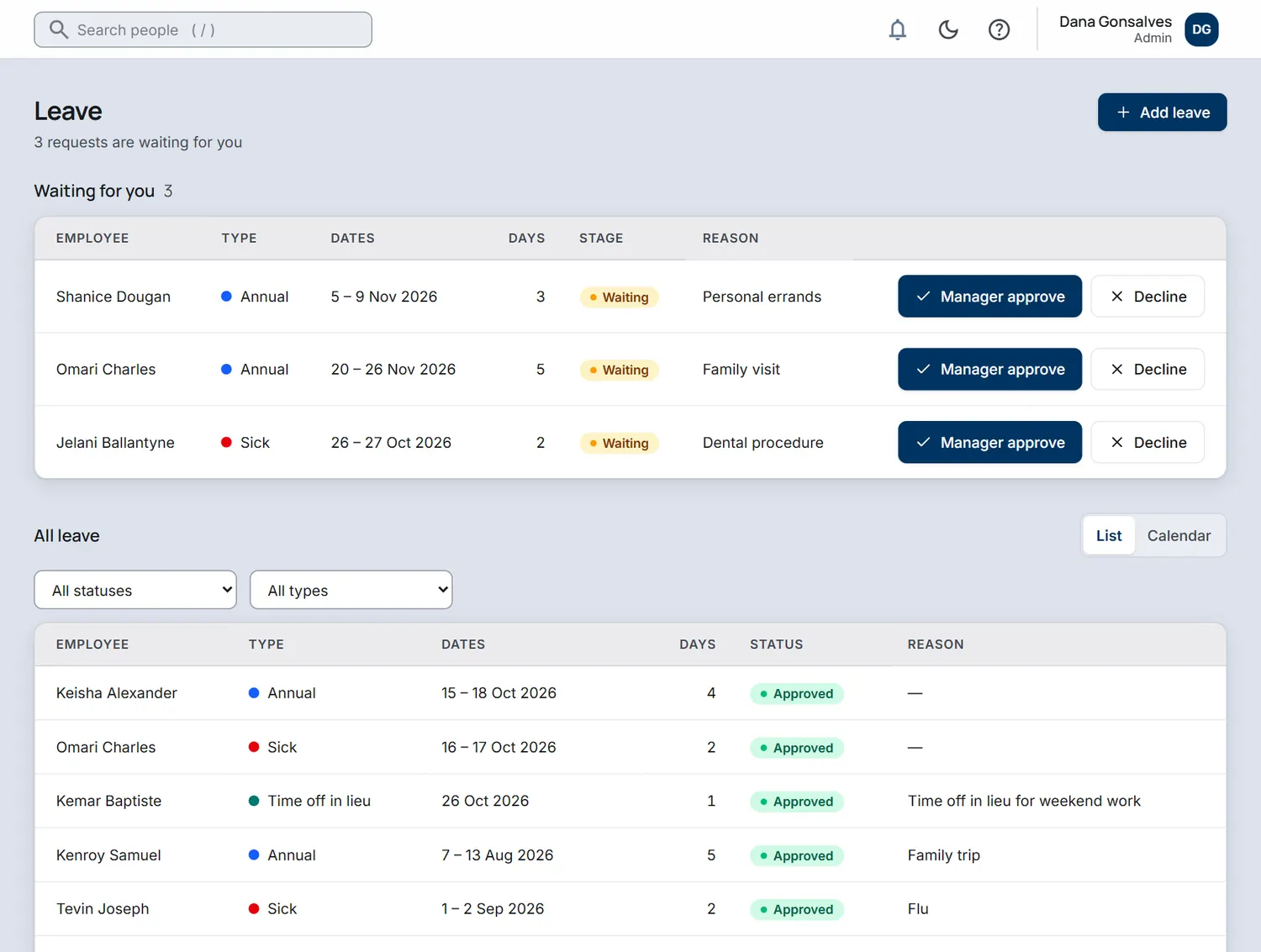
The Leave screen: three requests waiting for approval with Manager approve and Decline buttons, and a list of all leave below.
Leave requests and approvals, sample company.
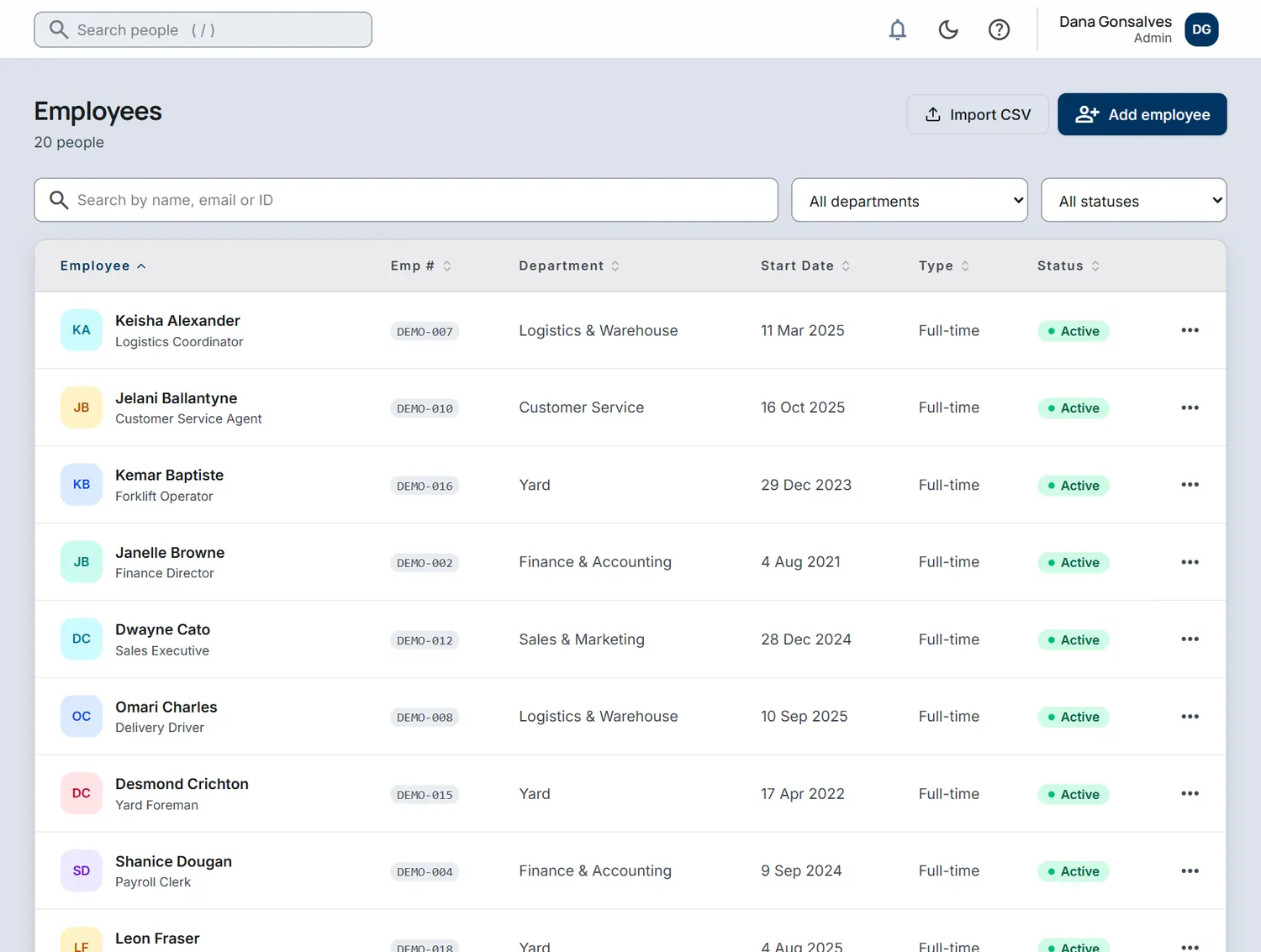
The Employees list: names, job titles, departments, start dates and status for a sample company of 20 people.
The employee list, sample company.
Starter

People and org chart

One record per person with job, contact details, documents and history. Departments with sub-departments, and a live org chart that shows who reports to whom.

See how it works

See every HR feature in detail

02 Who it is for

Built for the way Caribbean teams actually work.

Three very different workplaces, one system. Pick the pattern that looks like yours.

Office teams

A manager on every team, annual leave to approve and records to keep tidy. Give every employee their own portal and stop answering the same questions.

  • Org chart and departments
  • Leave balances and approvals
  • Onboarding plans and a Welcome checklist

Hospitality

Rotating shifts, seasonal staff and managers who are never at a desk. Plan the roster, track hours and keep contracts and certificates current.

  • Weekly shift roster by area (Enterprise)
  • Time clock and attendance
  • Hiring, with a talent pool for seasonal staff

Construction and field crews

People spread across sites and trades. Know who is on which crew, whose work permit is about to expire, and who is away this week.

  • Departments, sub-departments and crews
  • Work permit and document expiry alerts
  • Talent pool for day-crew hiring
  • Day-rate crews, if you add payroll

03 How it works

From sign-up to a calmer Monday, in three steps.

  1. Set up your company

    Create your account, add departments and leave types, then bring in your people one by one or import them from a spreadsheet. New hires can start from an onboarding plan.

  2. Run the day to day

    Staff request leave, clock in and read announcements in the portal. Managers approve in a tap, and the Today screen shows what needs you.

  3. Stay on top of it

    See who is away, what is coming up and which documents are about to expire. Open Insights for headcount, turnover and absence, build a report when someone asks, and trace any change in the audit trail.

04 Payroll module, an add-on

Add payroll when you are ready.

HR is a complete product without it. When you want to pay people from the same records, switch on the payroll module from Settings. It is free during your trial, so you can try a real pay run before you decide.

  • NIS and PAYE for St Vincent and the GrenadinesRates, ceilings and the standard deduction are built in and checked against the published rules.
  • Day-rate crews and salaried staff, side by sideFortnightly crews are paid by day rate times days worked. Monthly staff are paid a salary.
  • Overtime, time off in lieu and payslipsYour own overtime types, banked time off, and payslips staff open in the portal once the run is paid.
  • Bank files and statutory figuresApprove the run, download the bank file and keep the NIS and PAYE figures ready to file.
St Vincent and the Grenadines LiveNIS, PAYE, payslips and bank files are in daily use.
St Lucia In the worksBeing built now. It opens once an accountant has checked the rules.
Grenada In the worksBeing built now. It opens once an accountant has checked the rules.
Other islands ComingEach island opens only after an accountant has checked its rules. We would rather be late than wrong.

See the payroll module in detail

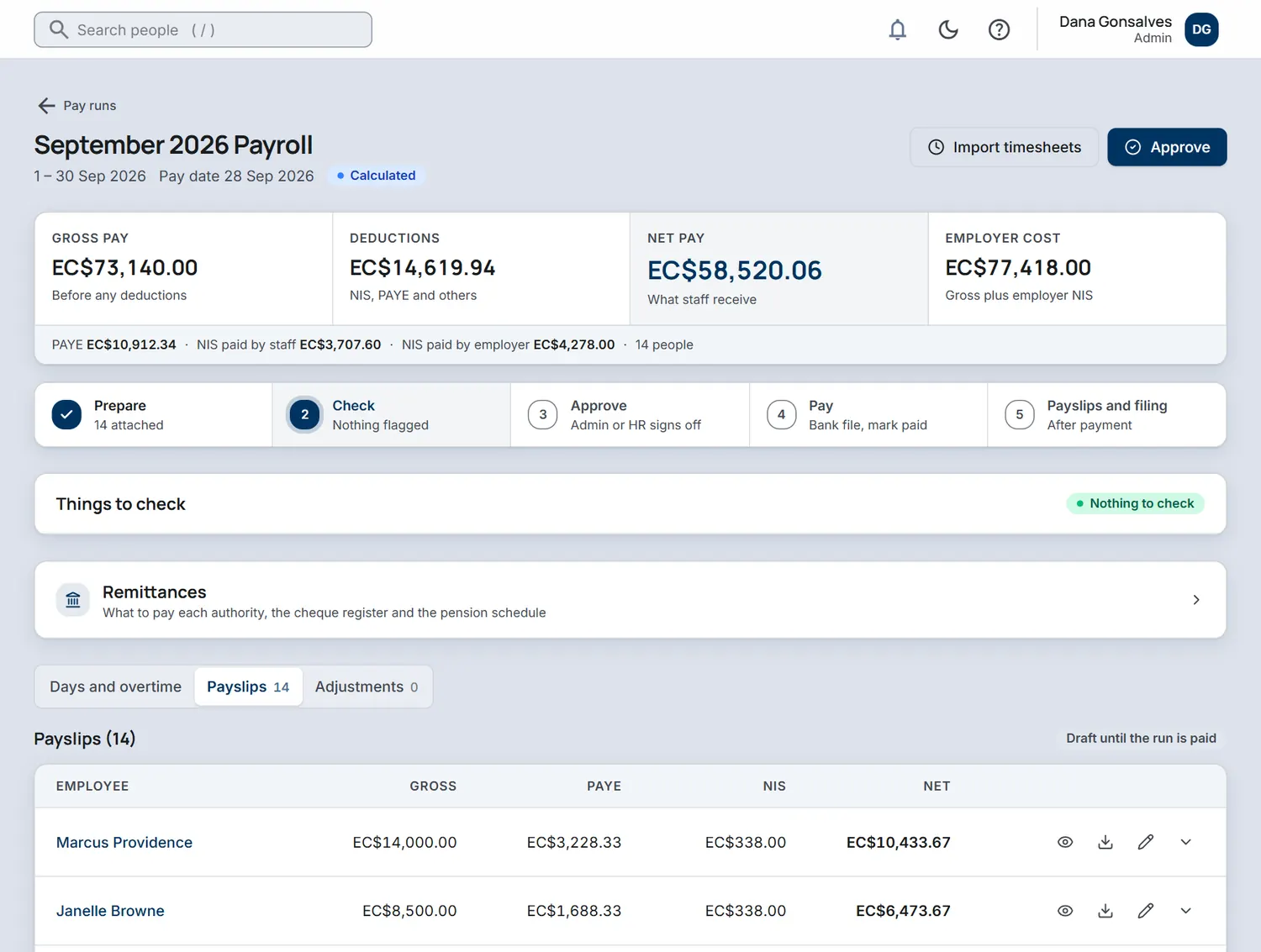
A pay run for September 2026 in the payroll module: gross pay, deductions, net pay and a list of payslips.
Example
Payslip, monthly2026 rules
Gross salary
12,000.00
NIS, employee6.5% of insurable pay, up to the EC$5,200 monthly ceiling
−338.00
PAYEAfter the EC$25,000 yearly standard deduction
−2,668.34
Net pay (EC$)
8,993.66

Employer NIS of 390.00 (7.5%) is paid on top and never deducted from the employee.

Screens from a sample company. The payslip is an illustration of how one adds up; your accountant should still confirm figures for your own situation.

05 Security and data

Your people's data, handled with care.

Employee records are some of the most sensitive information a business holds. Here is how we protect them.

Need the detail? If your IT team or auditor wants to know more about how we protect your data, ask and we will answer in writing.

Hosted in the UK

The application and its database run on dedicated servers in a London data centre, not shared hosting.

Nightly backups

Your records and the documents you upload are backed up every night to encrypted storage and kept for 30 days.

Encrypted personal data

NIS numbers, tax IDs, passport details and bank accounts are encrypted before they are stored, and everything travels over HTTPS.

Two-factor sign-in

Everyone can add an authenticator app as a second step. Your company administrator can make it a requirement for the whole team.

Audit trail

Changes are logged with who made them and when, so “who changed this?” has a factual answer.

Role-based access

Every person is given a role: employee, manager, HR or administrator. Employees see their own record, managers see their team, and sensitive settings stay with administrators.

Private workspace

Your company’s records live in their own space and are never visible to any other company. If you run several companies, switch between them with one sign-in.

Data retention

If you cancel, your data is deleted 90 days later, unless the law says it must be kept longer.

06 Questions

Straight answers.

Can I use IslandsHR for HR only?

Yes. HR is the product and it is complete on its own: people records, org chart, leave, time and attendance, documents, the employee portal and more, depending on your plan. Payroll is an optional module you can ignore for as long as you like.

What do my staff see?

Each employee gets their own sign-in to the employee portal. They can request leave, clock in, see their schedule, read announcements and company documents, and keep their own details up to date. New hires also see a Welcome checklist. Managers also see their team's leave and time to approve.

Is there a free trial?

Yes. New companies start with a free trial so you can add real people and try real workflows before you decide. See the pricing page for how the plans compare.

Will it warn me when a work permit or document is about to expire?

Yes. The Today screen lists work permits and documents that are expired or about to expire, next to birthdays and work anniversaries, so nothing lapses by surprise.

Can new hires fill in their own details?

Yes. A new hire gets a Welcome checklist in the employee portal. They upload their documents and submit their NIS, TIN, bank and emergency contact details. HR approves those details before anything is saved to their record. Onboarding plans are part of every plan.

How do you handle people who leave?

Each departure follows a leaving checklist with an exit interview and asset returns. HR gets a final pay summary to review, covering leave payout, open loans and time off in lieu. It is never paid automatically. On the last day the person's portal login is switched off, and open shifts and leave are cancelled. When the checklist is complete they are removed from pay batches and moved to a Former employees archive, and you can download a leaver file. You can set how long old records are kept, and they are anonymised only after an admin confirms. Offboarding is part of the Professional plan.

Can I add payroll later?

Yes. Switch the payroll module on from Settings whenever you are ready. It is free during your trial, and it uses the people you already have, so there is nothing to re-enter.

Which islands does payroll work for?

St Vincent and the Grenadines is live today, with NIS and PAYE built in. St Lucia and Grenada are in the works, and other islands will follow one at a time. We open an island only after an accountant has checked its statutory rules, because a payroll that is nearly right is worse than no payroll. HR features work for any island today.

Does IslandsHR file my NIS and tax returns for me?

It prepares the figures and the statutory schedules, and shows exactly how each number was reached. You or your accountant still review and submit them. You stay in control of what goes to the authorities.

Where is our data stored, and who can see it?

On servers in the United Kingdom. Sensitive personal fields such as NIS numbers, tax IDs and bank details are encrypted before storage. Each company's data is separate, and inside a company, access follows roles. See the security section for the full list, including nightly backups.

Can I use it on a phone?

Yes. IslandsHR is a web app that adapts to a phone screen, so managers can approve leave and staff can check their schedule from a browser without installing anything.

Are staff survey answers anonymous?

Yes, by design. Answers are not linked to a person, and results for groups under 5 are hidden. You see response rates and the trend over time. Pulse surveys are part of the Professional plan.

How do I get help?

On every plan you can message the IslandsHR team from inside the app. You can also use the contact form on this site, which sends your message straight to us.

Who is behind IslandsHR?

IslandsHR is built and run by 61 West Labs Ltd, working with employers in St Vincent and the Grenadines. You can reach the team at hello@islandshr.com.

Try IslandsHR with your own people.

Create a company account, add a few employees and see how the day-to-day feels. Prefer to talk first? Write to us and a real person will reply.